
If you’re enjoying using Innago and looking for an additional stream of income, our referral program is just for you. Share your link, your referral signs up, and you earn a commission automatically.
How Does It Work?
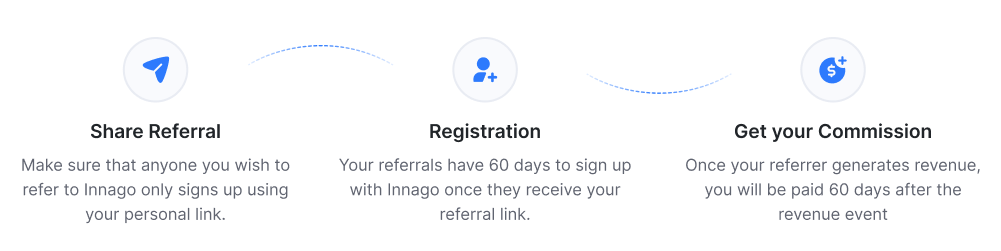
Important: make sure anyone you refer signs up using your link only. Otherwise, we won’t be able to credit you for the referral.
How Much Can I Earn?
You’ll receive 25% of the revenue Innago earns from your referral for their first 12 months using Innago.
This is not 25% of what they pay through Innago. It’s only 25% of the revenue Innago actually earns (after processing fees).
revenue
(25%)
That $4.75 isn’t a one-time payment: you’ll earn it every month they pay rent, for their first 12 months. Since your referral link never expires, you can keep sharing it anytime, and since there’s no cap on referrals, you can refer as many people as you want.
These numbers are just an example to illustrate how earnings can add up. Your actual payout depends on your referrals’ rent volume, tenant count, and payment activity.
How Do I Sign Up?
- Look for the “Refer & Earn” icon in the bottom-left corner of your Innago dashboard (or the pop-up prompt in the bottom-right) and click Get Started.
- A panel opens on the right with your unique referral link. Copy it from there.
- Check your inbox for an activation email to set up your Post Affiliate Pro login. Don’t see it? See the next section below.

What if I Didn’t Receive an Activation E-mail?
Go to the log in page and click “Forgot Your Password?” Enter the email you use to log in to Innago, and you’ll receive a reset email. Once reset, log in to Post Affiliate Pro with your Innago email and new password.

How Will I Receive My Referral Payments?
Once you activate your account, you’ll add your PayPal details to receive payments. See our full guide on accessing and using the referral portal.
How Can I Access My Referral Account Portal?
Click the “Refer & Earn” icon in the bottom-left corner of your account, then click Access your Affiliate Program to reach the login screen.
