Innago Help Center

Advice and answers from the Innago Team

Generic selectors
Exact matches only
Search in title
Search in content
Post Type Selectors
post
Filter by Categories
01. Getting Started with Innago / Dashboard
02. Creating and Editing Properties
03. Adding Tenants and Lease Terms
04. Adding your Bank Accounts
05. Applications and Screening
06. Uploading / Signing Leases and Documents
07. Viewing and Creating Invoices
08. Tracking Expenses
09. Tenant Communication
10. Managing Maintenance
11. Marketing your Rentals
12. Team Management
13. Viewing Reports
14. Settings
15. Tenant Management
16. Referrals and Integrations
17. Help Articles for Tenants
A. Adding and Deleting Users
A. Adding, Deleting and Archiving Properties
A. Adding, Editing and Deleting Tenants
A. Creating New Invoices
A. Customizing Application Templates
A. Learning the Basics
A. Messaging your Tenants
A. Notifications
A. Setting up a Document Template
Accelerent
B. Adding / Editing Charges and Fees
B. Adding Lease Terms
B. Creating Messaging Templates
B. Editing Property Details
B. General Settings
B. Managing User Roles
B. Online Document Signing
B. Profile
B. Requesting Applications
C. Assigning Bank Accounts to Properties
C. Editing Lease Terms
C. Late Fees
C. Notes
C. Recording Payments and Managing Invoices
C. Tenant Screening and Reports
C. Uploading and Downloading Documents
D. Applications and Screening FAQs
D. Crediting, Deleting and Exporting Invoices
D. General FAQs
D. Property Settings
D. Renewing and Terminating Leases
D. Renters Insurance
E. HOAs
E. Income FAQs
E. Special Lease Scenarios / Cases
Integrations
PlacePay General FAQ's
PlacePay General FAQ’s
PlacePay Landlord
PlacePay Landlord
PlacePay Tenant
PlacePay Tenant
Uncategorized

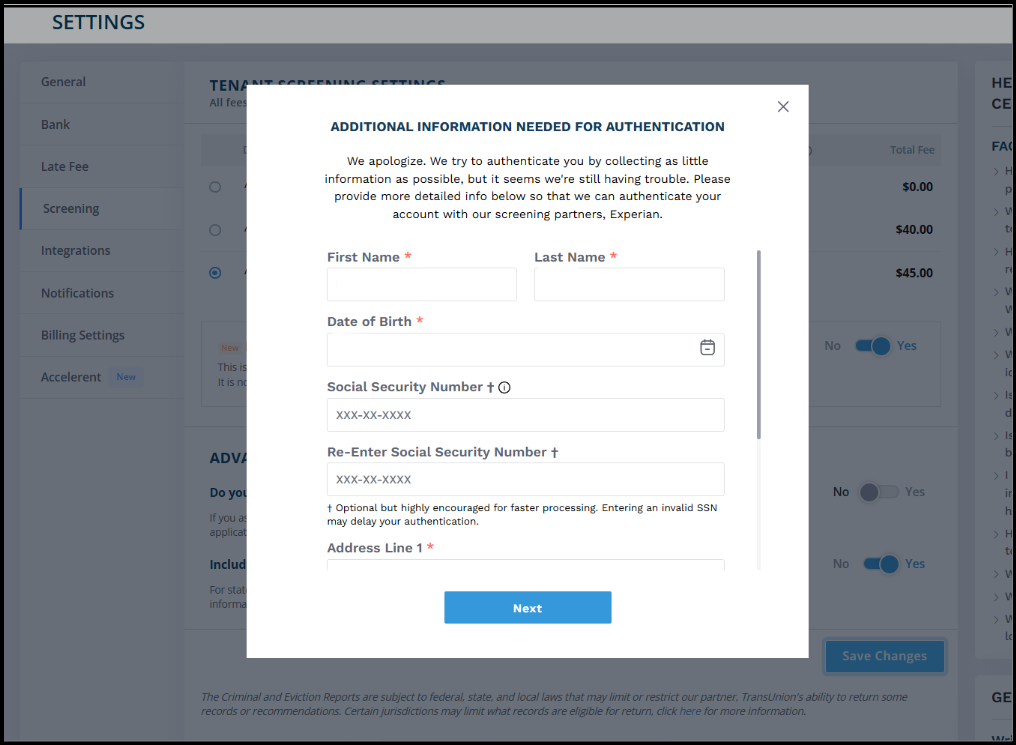
If you see the “Additional Info Needed for Authentication” message while using applications and screening in Innago, this is a verification requirement from our partners at Experian.

Why am I seeing this?

Experian requires identity re-verification if it has been 365 days since your last identity verification. Experian is essentially just trying to verify the legitmacy of the users sending these applications and allows you to continue using screening services through Innago.

What information should I use?

Please enter the personal information for the primary account holder, meaning the person who originally created the Innago account.

Using a different person’s information may cause the verification to fail.

Do I need to use my SSN?

Experian may encourage using your Social Security Number (SSN) because it can help speed up processing.

This is only a security verification step:

  • No hard credit inquiry is pulled
  • Innago does not store your SSN information
  • Your information is encrypted and securely passed directly to Experian for authentication only

What happens if verification fails?

If the authentication is attempted 3 times unsuccessfully, you will need to wait 24 hours before trying again.

To avoid delays, please make sure all information entered is as accurate as possible before submitting.
 

Still need help?

If anything is unclear or you need additional assistance, please reach out to our support team and we’ll be happy to help.