Innago Help Center

Advice and answers from the Innago Team

Generic selectors
Exact matches only
Search in title
Search in content
Post Type Selectors
post
Filter by Categories
01. Getting Started with Innago / Dashboard
02. Creating and Editing Properties
03. Adding Tenants and Lease Terms
04. Adding your Bank Accounts
05. Applications and Screening
06. Uploading / Signing Leases and Documents
07. Viewing and Creating Invoices
08. Tracking Expenses
09. Tenant Communication
10. Managing Maintenance
11. Marketing your Rentals
12. Team Management
13. Viewing Reports
14. Settings
15. Tenant Management
16. Referrals and Integrations
17. Help Articles for Tenants
A. Adding and Deleting Users
A. Adding, Deleting and Archiving Properties
A. Adding, Editing and Deleting Tenants
A. Creating New Invoices
A. Customizing Application Templates
A. Learning the Basics
A. Messaging your Tenants
A. Notifications
A. Setting up a Document Template
Accelerent
B. Adding / Editing Charges and Fees
B. Adding Lease Terms
B. Creating Messaging Templates
B. Editing Property Details
B. General Settings
B. Managing User Roles
B. Online Document Signing
B. Profile
B. Requesting Applications
C. Assigning Bank Accounts to Properties
C. Editing Lease Terms
C. Late Fees
C. Notes
C. Recording Payments and Managing Invoices
C. Tenant Screening and Reports
C. Uploading and Downloading Documents
D. Applications and Screening FAQs
D. Crediting, Deleting and Exporting Invoices
D. General FAQs
D. Property Settings
D. Renewing and Terminating Leases
D. Renters Insurance
E. HOAs
E. Income FAQs
E. Instant Onboarding
E. Special Lease Scenarios / Cases
Integrations
PlacePay General FAQ's
PlacePay General FAQ’s
PlacePay Landlord
PlacePay Landlord
PlacePay Tenant
PlacePay Tenant
Uncategorized

If you’re enjoying using Innago and looking for an additional stream of income, our referral program is just for you. Share your link, your referral signs up, and you earn a commission automatically.

Jump to a Section

How Does It Work?

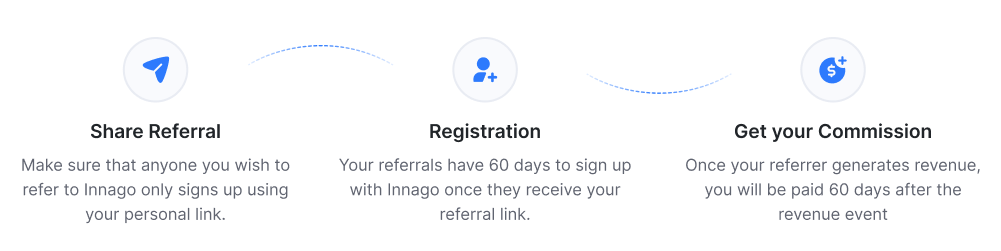
Referral timeline

Important: make sure anyone you refer signs up using your link only. Otherwise, we won’t be able to credit you for the referral.

$25 Minimum Balance
Commissions are paid out at the beginning of each month, if your referral balance reaches $25. If below $25, your payout rolls over to the next month, and stays there until your balance crosses $25.

60-Day Payout Policy
Once your referral generates revenue, you’re paid 60 days later. This is our standard processing time.

How Much Can I Earn?

You’ll receive 25% of the revenue Innago earns from your referral for their first 12 months using Innago.

This is not 25% of what they pay through Innago. It’s only 25% of the revenue Innago actually earns (after processing fees).

$1,000
Tenant’s rent payment

$19
Innago’s
revenue

$4.75
Your payout
(25%)

$57/yr
Your payout over 12 months

That $4.75 isn’t a one-time payment: you’ll earn it every month they pay rent, for their first 12 months. Since your referral link never expires, you can keep sharing it anytime, and since there’s no cap on referrals, you can refer as many people as you want.

Example Yearly Estimate

$57/yr
From 1 tenant, of 1 property owner you refer

× 20 tenants

$1,140/yr
1 property owner you refer, with 20 tenants

× 5 referrals

$5,700/yr
Your estimated total payout from 5 referrals with 20 tenants each

These numbers are just an example to illustrate how earnings can add up. Your actual payout depends on your referrals’ rent volume, tenant count, and payment activity.

How Do I Sign Up?

  1. Look for the “Refer & Earn” icon in the bottom-left corner of your Innago dashboard (or the pop-up prompt in the bottom-right) and click Get Started.
  2. A panel opens on the right with your unique referral link. Copy it from there.
  3. Check your inbox for an activation email to set up your Post Affiliate Pro login. Don’t see it? See the next section below.

Refer and Earn panel in the Innago dashboard

Your referral link and account activation status appear in the Refer & Earn panel.

What if I Didn’t Receive an Activation E-mail?

Go to the log in page and click “Forgot Your Password?” Enter the email you use to log in to Innago, and you’ll receive a reset email. Once reset, log in to Post Affiliate Pro with your Innago email and new password.

Post Affiliate Pro login page with the Forgot Your Password button circled

How Will I Receive My Referral Payments?

Once you activate your account, you’ll add your PayPal details to receive payments. See our full guide on accessing and using the referral portal.

How Can I Access My Referral Account Portal?

Click the “Refer & Earn” icon in the bottom-left corner of your account, then click Access your Affiliate Program to reach the login screen.

Access your Affiliate Program button

Who Do I Contact if I Have Any Issues or Questions?

For anything related to the Refer & Earn program, reach out to our Referral Program Manager:
Tiya Yempati
tiya@innago.com
513-760-8125