Important Notice (For Landlords and Tenants)
Before proceeding with an account deletion request, please note:
If your account contains electronic data (eCheck or credit card transactions), we are unable to permanently delete the account. This applies to both landlords and tenants.
This restriction is due to legal and regulatory requirements related to electronic payment processing and record retention.
For Landlords
(Applicable only if your account does not contain any electronic processed payments)
If your account does not include any electronically processed payments, you may request deletion using one of the following methods:
Option 1: Email Request
Send an email to support@innago.com.
Our team will verify your account details and delete the account from the backend once verification is complete.
Option 2: Mobile Application Request
You can also submit a deletion request directly through the mobile app:
-
Log in to the mobile application.
-
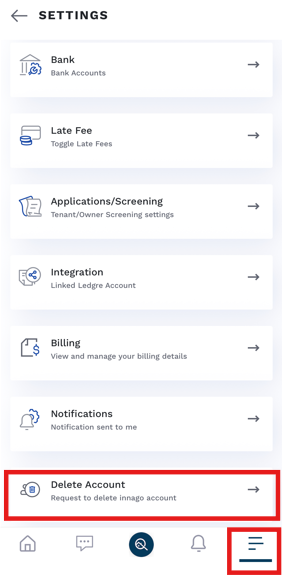
Navigate to the Settings section.
-
Tap on Delete Account.
-
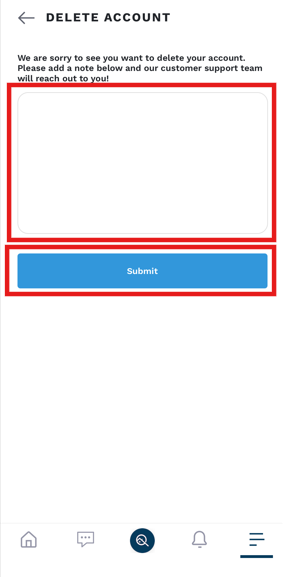
Specify your reason for deletion.
-
Submit the request.
Submitting the request through the app will trigger an email notification to our team. After verifying your details, we will proceed with deleting your account from the backend.