
There may be situations in which a security deposit return needs to be cancelled. Good news! We have the capability to cancel deposit returns before 5PM EST the same business day of the transaction. Unfortunately, if the cancellation window passes, we will be unable to intervene with the return.
If you wish to cancel a security deposit return within the cancellation window, please follow these steps
- Click on the Income tab from your main menu
- Locate the Security Deposit invoice (you can learn how to use filters to open the invoice by clicking here)
- Once the invoice details are open, click the 3 vertical dots next to the “Initiated” return
- Click “Cancel”
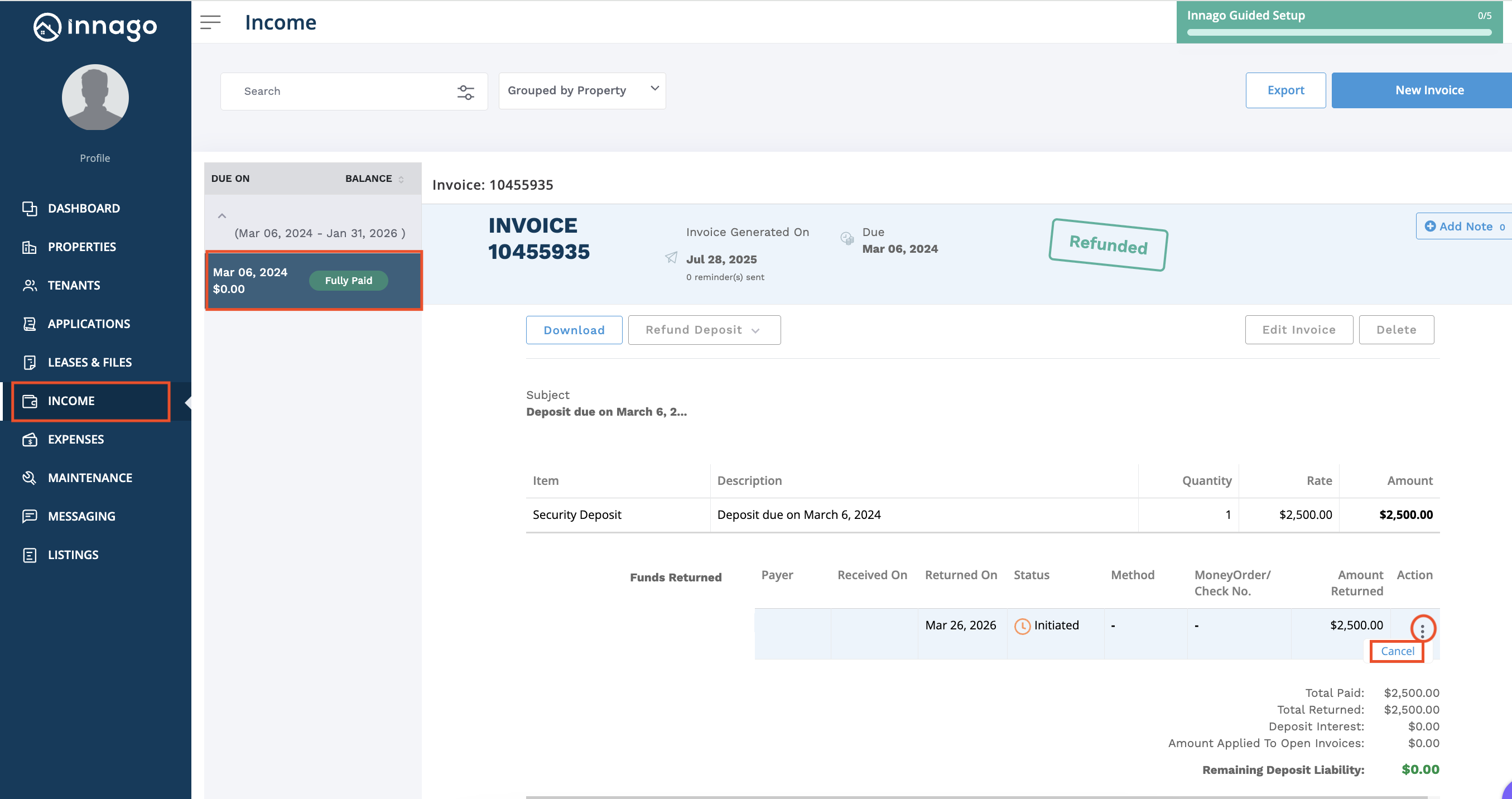
Please note, if the window has passed to return a security deposit, the cancel option will not be available. If this is the case, the deposit will continue processing and will be returned to the tenant.
If the tenant is willing to assist, there is another option for the security deposit return to be cancelled. If the tenant does not select the return destination from their account within 5 days and there is no backup address provided, the return will automatically be cancelled. For more information about tenants receiving their security deposit returns, click here.